How It Works

Join your favourite local stores, collect loyalty points with every purchase, and unlock exciting rewards – all from one easy-to-use platform.

Step 1

Download the ShopEarn App

Get started by downloading the ShopEarn.co.uk mobile app on your smartphone.

Step 2

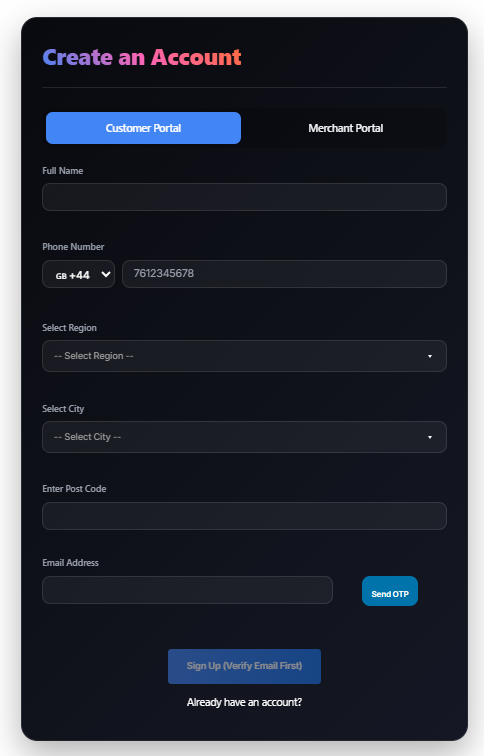
Create Your Customer Account

Register in just a few minutes.

Enter Your Details
  • Full Name
  • Phone Number
  • Region
  • City
  • Post Code
  • Email Address

Click Send OTP to verify your email address.

Step 3

Verify & Sign Up

After receiving your OTP:

  1. Enter the verification code.
  2. Create your:
    • Username
    • Password
  3. Click Sign Up.

Congratulations! Your ShopEarn account is now ready.

Step 4

Visit Your Customer Dashboard

Once registered, you’ll be taken to your personal dashboard where you can:

✔ View your loyalty points
✔ Check your rewards history
✔ Discover participating stores
✔ Track available offers and vouchers
✔ Redeem rewards instantly


Step 5

Join Verified Stores

Browse the list of ShopEarn Verified Shops and join your favourite stores.

You can join a store by:

Option 1

Scan the store's QR code.

Option 2

Show your personal ShopEarn QR code to the store staff.

Joining takes only a few seconds.

Step 6

Shop & Earn Loyalty Points

Every purchase earns points instantly when you scan or show your QR code at checkout. Points are added to your account automatically, making it easy to track and redeem rewards. The more you shop, the more rewards you unlock.

Step 7

Redeem Your Rewards

You can redeem your points directly from the same store whenever eligible rewards become available.

Scan | Collect | Redeem

Download the ShopEarn.co.uk app, join your favourite stores, and turn every purchase into rewards.